
Workflow
Sentence Mining With Anki: Examples, Template, and Checklist
Learn how to sentence mine with Anki: choose one-target sentences, see a complete card example, use a practical template, and control review load.
Sentence mining with Anki means saving a useful sentence from material you encounter, turning one part of it into a clear retrieval prompt, and letting Anki schedule later reviews. With video, the card can keep the speaker’s voice, timing, and scene instead of reducing the example to isolated text.
The short answer to “How do I sentence mine?” is: watch for meaning first, mark a small number of useful moments, verify each complete sentence, give every card one learning target, and let review difficulty decide what you collect next.
If your source is video, the complete video-to-Anki workflow shows where sentence selection fits between a permitted source and an inspected deck.
What sentence mining is
If stopping to capture each line breaks immersion, separate watching and card building into two passes.
Sentence mining sits between passive immersion and deliberate review. You encounter language in a show, interview, vlog, lesson, podcast video, or recording. When a moment contains something useful, you save it. Anki then schedules repeated attempts so the language does not disappear after one viewing.
The sentence is not valuable merely because it is authentic. It is valuable when it gives a target expression a clear, memorable context.
A mined sentence might help you:
- Recognize a word at natural speed.
- Notice how a familiar word changes meaning in context.
- Remember a common collocation instead of an isolated definition.
- Distinguish two similar sounds or grammar forms.
- Revisit a phrase connected to a scene you enjoyed.
Sentence mining does not require saving everything you do not know. Skipping a sentence is often the correct choice.
How to choose sentences
Prefer one clear learning target
The best candidate usually contains one important unknown or one feature you want to notice. A sentence with five unknown words may be authentic, but it is difficult to test cleanly and expensive to explain.
Ask whether the rest of the sentence provides enough support to infer or understand the target. If it does, the sentence can reinforce both the new item and language you already know.
Prefer complete, natural units
Video subtitles often break at convenient screen positions rather than sentence boundaries. Join fragments when necessary and separate lines that contain two speakers or two independent ideas.
Read the sentence aloud and listen again. If the clip begins halfway through a word or ends before the speaker finishes, adjust the timing before it becomes part of the card.
Prefer language you expect to meet again
Frequency is useful, but personal relevance matters too. A phrase used in your work, hobbies, favorite genre, or recurring conversations has more opportunities to be reinforced outside Anki.
Highly specialized names, jokes that require a long explanation, and poetic one-offs can still be worth saving when you love them. Treat those as personal keepsakes, not automatically as high-priority vocabulary.
A 30-second sentence-mining checklist
Keep the sentence when you can answer yes to most of these questions:
- Is it one complete, natural sentence or phrase?
- Does it have one main word, expression, sound, or grammar target?
- Can you understand the rest without a long explanation?
- Is the target personally useful or likely to appear again?
- Can the card test it without showing the answer on the front?
- If you keep media, are the audio and source permitted and easy to verify?
If the sentence fails the first three checks, skipping it is usually more useful than repairing it with extra hints.
Keep ownership and permission in view
Use video files and media clips you have the right to process and retain. The fact that a video is easy to access does not automatically grant permission to download, redistribute, or publish its contents.
How to build the card
Start by deciding what kind of retrieval you want.
| Goal | Useful front | Useful back |
|---|---|---|
| Listening recognition | Short audio clip | Sentence, focus expression, meaning, source |
| Reading recognition | Sentence with target emphasized or hidden | Reading, meaning, audio, image |
| Meaning recall | Target expression in its sentence | Concise meaning and original media |
| Production | Meaning or situation | Target expression and original sentence |
For most mined video cards, a recognition card is the safest default. It stays close to the experience of meeting the phrase in real input and avoids pretending there is only one valid way to express an idea.
The difference between a weak card and a useful one is often subtraction. A focused prompt asks one question; translation, explanation, audio, and source context can appear after the attempt instead of competing on the front.
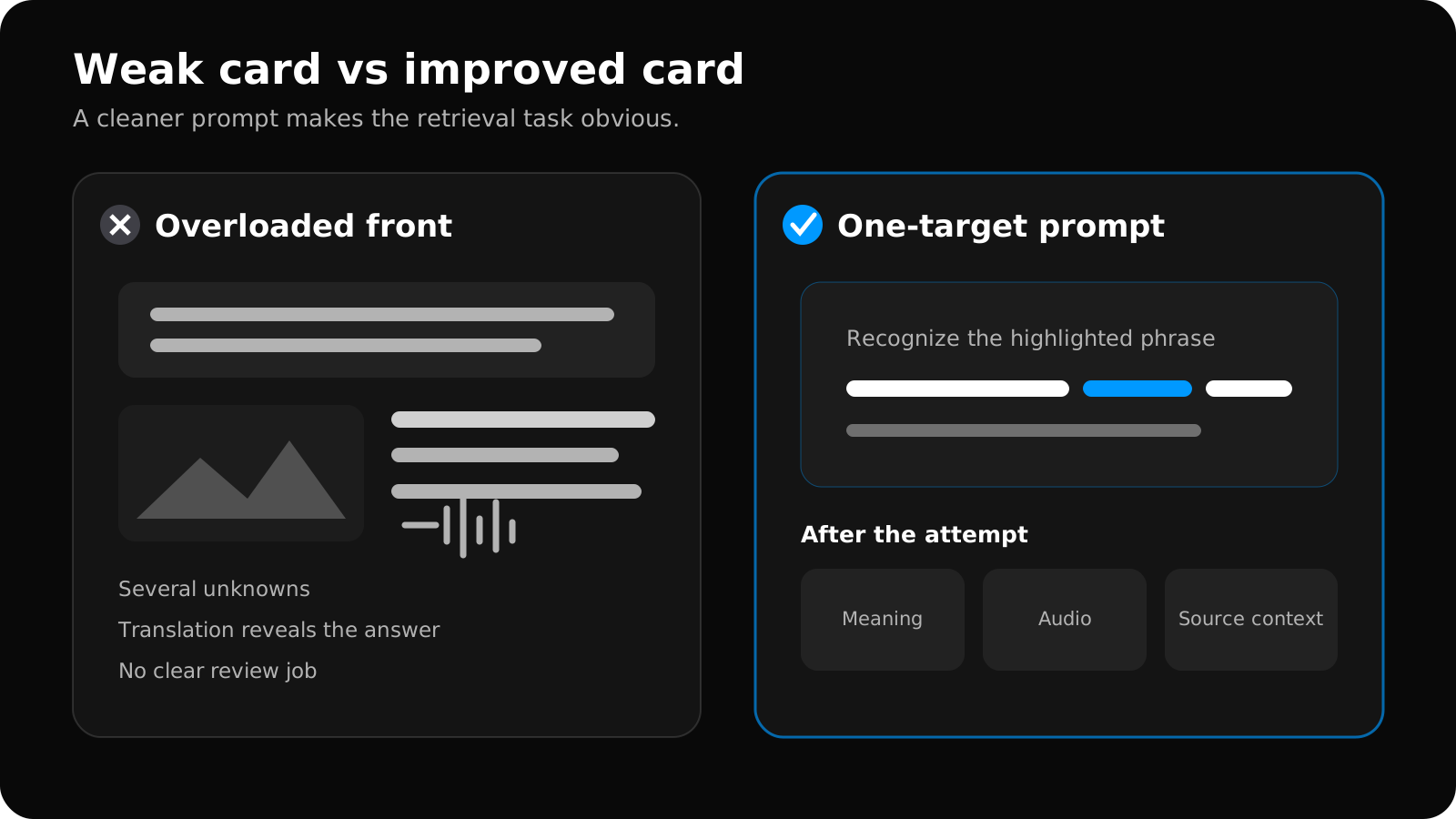
Swipe to explore the full diagram.
Once the retrieval goal is clear, choose fields and a front/back design for that job.
When you are ready to turn those choices into a repeatable system, use the sentence-mining Anki deck setup guide for the minimal note type, one-deck-plus-tags organization, import structure, and five-card test.
If you want a reusable starting point, the guide explains the seven recommended Anki fields and provides separate listening, reading, and production card layouts.
If you prefer ready-to-edit files, the free language-learning Anki template includes front and back HTML, styling, field explanations, and an importable starter text file.
Keep fields separate. The Anki manual notes that separate fields make it easier to move audio, hints, and other information between the front and back through a template change.
Use the translation as a clarification, not as a replacement for the original scene. Short explanations are often better than a list of every dictionary sense. If a literal translation is misleading, explain the meaning the phrase has here.
Add a source field containing the video title, filename, and timestamp. Corrections are much faster when you can replay the exact moment.
A sentence-mining note example
Suppose a speaker says, “I ended up taking the earlier train.” You understand the sentence except for ended up taking, meaning that this was the final outcome after plans or circumstances changed. Store the evidence once, then let the card template express the learning job:
| Note field | What to store |
|---|---|
Sentence | I ended up taking the earlier train. |
Focus | ended up taking |
Meaning | finally took it after plans or circumstances changed |
Audio | The complete utterance with natural boundaries |
Image | A station frame only if it clarifies the situation |
Source | Title, filename or URL, and timestamp |
For listening recognition, show audio first and reveal the sentence and contextual meaning. For reading recognition, show the sentence with the focus hidden and reveal the expression plus audio. This is a sentence-mining template pattern, not a universal downloadable template: field names and card sides should follow the retrieval task.
Use the audio-and-image field layout and media placement examples when the note needs original sound or scene context.
Keep the review load sustainable
Mining is enjoyable because finding sentences feels productive. The cost arrives later as scheduled reviews.
Set a daily or weekly selection budget before you begin. For example, you might allow yourself five excellent cards from a long video rather than fifty acceptable ones. The precise number depends on your available review time; the important part is that creation volume follows review capacity.
Use the time you can actually spend reviewing to set a sustainable card budget for each video.
Once the card budget is realistic, use the sentence-mining deck-options guide to configure FSRS, desired retention, daily limits, sibling burying, display order, audio, and leech handling without copying an outdated preset.
When a card repeatedly fails, diagnose it:
- Is the target unclear?
- Does the sentence contain too many unknowns?
- Is the audio difficult for reasons unrelated to the target?
- Does the translation allow several interpretations?
- Do you actually care about remembering it?
Edit, simplify, or suspend the card instead of treating every lapse as a willpower problem. Anki’s search tools can help you find frequently lapsed cards using properties such as prop:lapses; see the official search documentation.
A strong sentence-mining loop is selective:
- Watch primarily to understand and enjoy the material.
- Mark only moments with clear learning value.
- Turn those moments into focused, structured cards.
- Preview a sample before importing a deck.
- Let review difficulty inform what you mine next time.
For an exported deck, the free Anki Import Checker can verify fields, templates, and bundled media before you commit the batch to daily reviews.
Sentence mining FAQ
What is the difference between sentence mining and making vocabulary cards?
Sentence mining begins with language encountered in meaningful material and keeps enough of that encounter to explain one target. A vocabulary card may start from an isolated word list. Either can work, but the mined sentence should earn its extra context rather than becoming an overloaded dictionary entry.
How many unknown words should a mined sentence contain?
There is no universal number, but one important unknown is a useful default. Keep a sentence only when the surrounding language makes the target understandable and the card can ask one clear question.
Do I need a special Anki sentence-mining template?
No. A Basic or Cloze note type can work if its fields and front/back design match the task. Separate sentence, focus, meaning, media, and source fields so you can change templates without rewriting every note.
The workflow improves when card creation and card review teach each other. If your mined cards are consistently confusing, change the selection rule—not just the card styling.
Related guides
What Is Sentence Mining? A Practical Beginner's Guide
Learn what sentence mining is, how one useful moment becomes a focused Anki card, what to save, and how to avoid turning immersion into data entry.
Read article →How to Choose Sentences for Sentence Mining
Use a five-part filter to choose understandable, useful, one-target sentences with clean context and avoid low-value cards that inflate reviews.
Read article →Sentence Mining vs Vocabulary Decks: Which Should You Use?
Compare sentence mining and isolated vocabulary cards across speed, context, ambiguity, audio, review cost, and beginner usefulness.
Read article →Sentence Mining Without Pausing Every Few Seconds: A Two-Pass Video Workflow
Keep video immersion intact with a two-pass sentence-mining workflow: watch and mark first, then turn only the strongest moments into Anki cards.
Read article →How Many Anki Cards Should You Make From One Video?
Set a sustainable card budget for each video using your review capacity, card format, current workload, and the value of each candidate sentence.
Read article →Best Anki Settings for Sentence Mining (FSRS Guide)
Configure FSRS, retention, learning steps, daily limits, sibling burying, audio, and leeches for a sustainable sentence-mining review workload.
Read article →How to Make Anki Cards From Videos: 5-Step Workflow
Make focused Anki cards from videos in five steps: select useful moments, verify text, add audio or images, structure fields, and inspect the APKG.
Read article →