
Tools
AI Anki Generators vs Manual Sentence Mining
Compare AI-assisted Anki generation with manual sentence mining across speed, control, accuracy, context, and cleanup.
An AI Anki generator is best at removing repetitive production work: transcription drafts, field population, clip boundaries, formatting, and deck packaging. Manual sentence mining is best at deciding why a moment matters and exactly what the card should test.
For most serious language learners, the strongest workflow is hybrid: automation proposes structured cards, and the learner selects, checks, and edits before those cards enter the review queue.
The practical comparison
The complete video-to-Anki workflow shows where those human checks sit between a permitted source and the finished deck.
| Dimension | AI-assisted generation | Manual sentence mining |
|---|---|---|
| Initial speed | Fast for many candidate cards | Slow, especially with clipping and formatting |
| Selection | Can overproduce without strong rules | Naturally selective |
| Transcript accuracy | Requires verification | Learner can check each moment closely |
| Translation | Fast draft, context errors possible | Slower, easier to tailor deliberately |
| Card consistency | Strong when fields and templates are fixed | Can drift across sessions |
| Personal relevance | Depends on selection controls | High because every card is chosen manually |
| Media timing | Automatable but imperfect | Precise but time-consuming |
| Review burden | Easy to create too many cards | Creation effort limits volume |
The workflow view makes the tradeoff clearer than a speed claim. Assistance can draft the repetitive middle—clips, fields, media, and packaging—while selection, rejection, and verification stay with the learner.
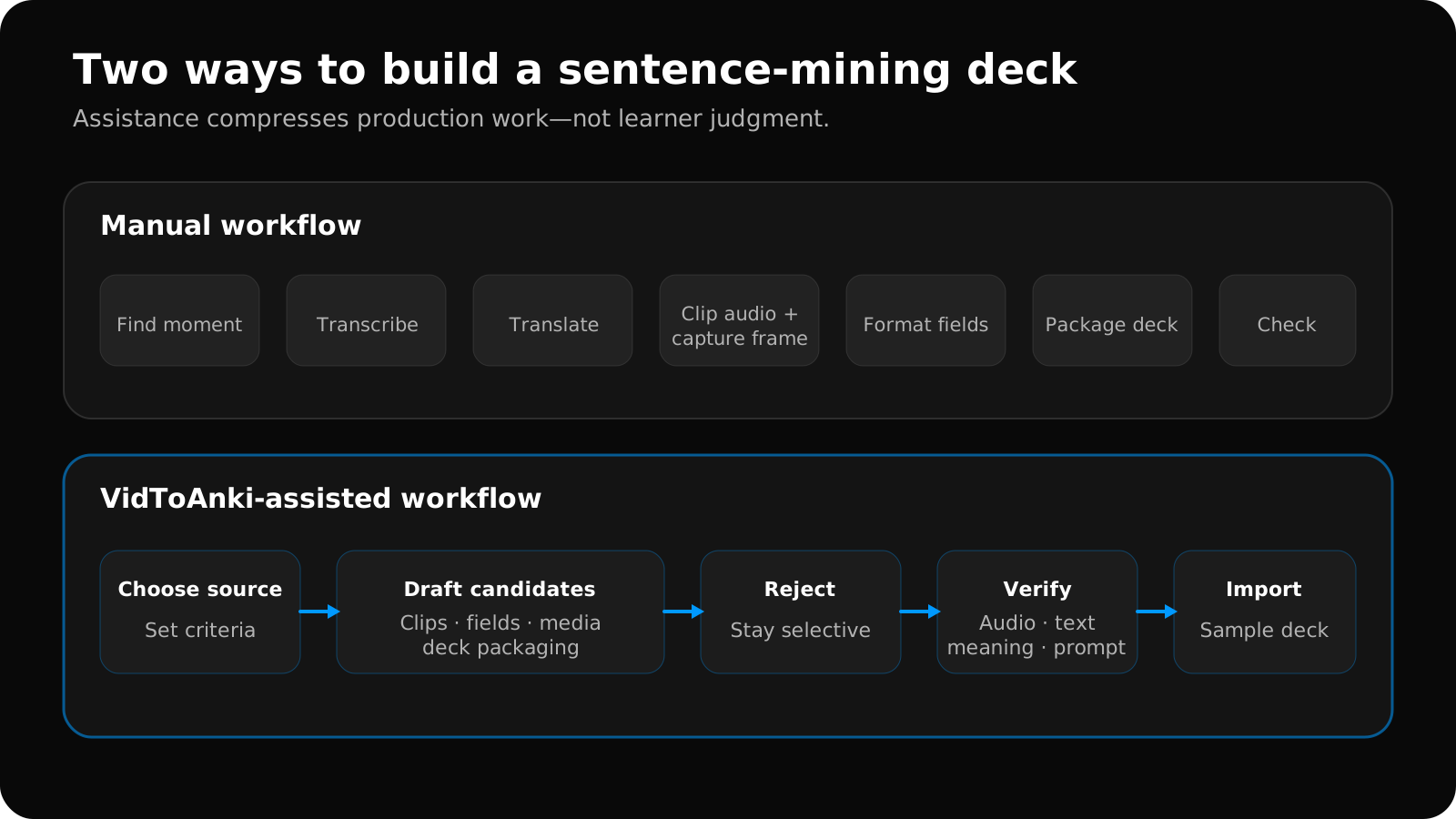
Swipe to explore the full diagram.
Neither column wins every row. The right choice depends on whether your bottleneck is mechanical work, judgment, or review capacity.
Where AI helps
Repeating the same field structure
Once you have decided that each note needs a sentence, focus expression, contextual meaning, translation, audio, screenshot, and source, automation can apply that structure consistently.
Consistency matters because Anki templates expect predictable fields. The Anki card-template guide explains how those fields control card generation and display.
Producing a first transcript and translation
Speech recognition and language models can create a useful draft much faster than manual typing. That is particularly valuable when the alternative is abandoning the card because capturing it takes too long.
The draft still needs comparison with the audio. Short words, names, informal speech, code-switching, and background noise are common sources of mistakes. A fluent-sounding translation can also be wrong for the scene.
Finding candidate moments
Automation can flag repeated vocabulary, complete sentences, or segments near a learner’s requested level. Treat this as triage rather than a final learning decision.
Packaging media and notes
Creating a clean .apkg with stable fields and included media is mechanical work that software can handle well. The Anki exporting documentation describes what a packaged deck can contain.
Where manual mining wins
Knowing why you care
You know whether a joke landed, a phrase solved a real misunderstanding, or a sentence connects to something you expect to say. A model can estimate usefulness but cannot fully replace that personal history.
Controlling the test
Manual miners often know immediately whether they want listening recognition, reading recognition, or production. A generator needs explicit settings or it may create visually complete cards with an unclear retrieval task.
Handling nuance
Register, irony, implied subjects, dialect, and cultural references can require more context than a short transcript provides. Manual review can preserve uncertainty instead of forcing a confident but misleading explanation.
Staying selective
Manual effort creates a natural limit. That limit can be frustrating during creation, but it protects the future review queue. Automation removes the friction, so the user needs a deliberate card budget.
A better hybrid workflow
Before generating, set a card budget based on actual review capacity.
Use automation for the first pass and human judgment for admission into Anki:
- Choose the source yourself. Start with a video you value and may process.
- Set a card budget. Decide how many moments your review capacity can support.
- Generate candidates. Let software draft clips, text, translations, fields, and screenshots.
- Reject aggressively. Remove duplicates, trivial lines, overloaded sentences, and moments you do not care about.
- Verify the survivors. Compare transcript and translation with the original audio and scene.
- Preview the template. Confirm the front does not reveal the answer and media appears where intended.
- Import a clean deck. Sample the actual
.apkginside Anki before committing to every card. - Learn from reviews. Repeated confusion should change future generation rules.
After packaging, import and inspect the APKG in Anki before committing to the batch.
AI assistance should shorten the distance between noticing a useful moment and reviewing a reliable card. It should not maximize the number of cards created.
The honest test is not “How many flashcards did the generator make?” It is “How many of these cards are accurate, focused, personally useful, and still welcome when Anki schedules them again?”
Related guides
Sentence Mining With Anki: Examples, Template, and Checklist
Learn how to sentence mine with Anki: choose one-target sentences, see a complete card example, use a practical template, and control review load.
Read article →Anki Card Templates for Language Learning: 4 Copyable Layouts
Compare four copyable Anki card templates for language learning, choose by retrieval goal, install safely, and test HTML, CSS, media, and mobile layouts.
Read article →How to Make Anki Cards From Videos: 5-Step Workflow
Make focused Anki cards from videos in five steps: select useful moments, verify text, add audio or images, structure fields, and inspect the APKG.
Read article →